
Analyzing smartphone UART logs is an important part of advanced mobile phone hardware and software troubleshooting.
Whether you are diagnosing a dead-boot smartphone, investigating a bootloop, checking PMIC initialization, or analyzing Qualcomm and MediaTek boot messages, UART logs can provide valuable clues.
To make this process easier, we developed RepairTheMobile UART Analyzer Pro v3.0, a Windows-based UART monitoring and diagnostic tool designed specifically for mobile phone repair technicians.
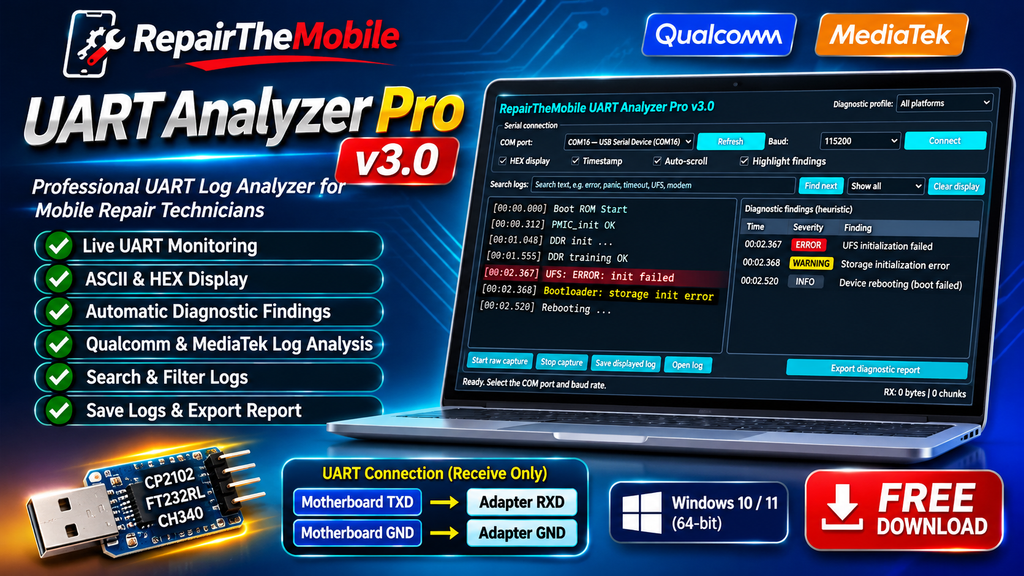
The software allows you to monitor real-time UART logs, search error messages, highlight potential problems, capture raw data, and generate diagnostic reports through a simple graphical interface.
Best of all, it comes with a standalone Windows executable. You don’t need to install Python to run the application.
Download RepairTheMobile UART Analyzer Pro v3.0
Software: RepairTheMobile UART Analyzer Pro
Version: 3.0
Platform: Windows 10 / Windows 11 (64-bit)
Category: Mobile Phone Repair / UART Diagnostic Tool
Developer: RepairTheMobile
1. What Is RepairTheMobile UART Analyzer Pro?
RepairTheMobile UART Analyzer Pro is a desktop application that helps mobile repair technicians monitor and analyze serial communication logs from smartphone motherboards.
Instead of manually reading hundreds or thousands of UART log lines, you can use its built-in search and diagnostic highlighting features to identify potentially important messages.
It is particularly useful for troubleshooting:
- Dead boot and boot failure.
- Bootloop problems.
- Qualcomm boot initialization errors.
- MediaTek boot messages.
- PMIC initialization issues.
- DRAM / DDR initialization errors.
- eMMC / UFS storage-related messages.
- Kernel panic and watchdog errors.
The diagnostic engine uses heuristic keyword matching to highlight possible problems. Findings are troubleshooting clues, not confirmed hardware diagnoses.
2. Main Features
Live UART Monitoring
Monitor real-time serial communication from your smartphone motherboard.
Select your COM port and baud rate, then connect to begin monitoring.
ASCII and HEX Display
View incoming UART data in ASCII or HEX format.This is useful when analyzing readable boot messages as well as raw serial data.
Automatic Diagnostic Highlighting
The application highlights potentially important log messages, including:
- ERROR
- FAILED
- PANIC
- TIMEOUT
- PMIC
- UFS
- DRAM
- WATCHDOG
This helps technicians locate suspicious messages quickly.
Search and Filter Logs
Search for specific keywords or error messages without manually scrolling through the complete log.
Raw UART Capture
Capture incoming raw UART data for further investigation.
Log Management
The application provides options to:
- Save displayed logs.
- Open previously saved logs.
- Clear the display.
- Export diagnostic reports.
3. Supported USB-to-UART Adapters
The application uses Windows serial COM ports.
Compatible USB-to-UART adapters include:
- CP2102 / CP210x
- FT232RL
- CH340
You must install the appropriate Windows driver before connecting your adapter.
Click here to download CP210x Windows Driver
Actual compatibility depends on the adapter, driver and UART configurationadapter.Actual compatibility depends on the adapter, driver and UART configuration
4. How to Connect UART to a Smartphone Motherboard
UART communication requires two basic connections for receive-only monitoring:
- TXD (Motherboard) → RXD (USB-to-UART Adapter)
- GND (Motherboard) → GND (USB-to-UART Adapter
5. How to Use RepairTheMobile UART Analyzer Pro
Follow these steps:
Step 1: Download the software
Download RepairTheMobile UART Analyzer Pro v3.0 using the download button above.
Step 2: Extract the application
If the software is distributed inside a ZIP file, extract it to a suitable folder.
Step 3: Connect your USB-to-UART adapter
Connect the adapter to your computer and install its appropriate driver.
Step 4: Launch the application
Double-click RepairTheMobileUARTAnalyzerPro.exe.
No separate Python installation is required.
Step 5: Select the COM port
Choose the COM port assigned to your USB-to-UART adapter.
Step 6: Select baud rate
Choose the baud rate matching your smartphone motherboard’s UART configuration.
Step 7: Connect
Click the Connect button to start monitoring.
Now connect Charger or do power on
Incoming UART messages will appear in the main log display.
Step 8: Analyze the logs
Use search, highlighting and diagnostic findings to investigate potentially important messages.You can also save the logs and use ChatGPT,Gemini or other AI Agents to diagnose the faults
6. UART Connection & Troubleshooting – Video Tutorials
Want to understand UART connections and smartphone motherboard debugging practically?
Watch these video tutorials from the RepairTheMobile YouTube channel.I
n these videos, we demonstrate UART connections, USB-to-UART adapters, serial communication and practical mobile motherboard troubleshooting.
Subscribe to the RepairTheMobile YouTube channel for more mobile phone hardware and software repair tutorials.
7. Important Diagnostic Disclaimer
RepairTheMobile UART Analyzer Pro is a diagnostic assistance tool.
Its findings are based on recognizable log patterns and heuristic keyword matching.
A highlighted error does not necessarily mean that the corresponding IC or hardware component is defective.
Always verify suspected problems using:
- Circuit schematics.
- Multimeter measurements.
- Oscilloscope measurements where appropriate.
- Known-good motherboard comparisons.
- Additional hardware and software diagnostics.
We will continue improving the software with additional diagnostic patterns, usability enhancements and new features.
If you find this software useful, share your feedback and suggestions with us.